A Facebook lookalike audience is a Meta Ads targeting option that reaches new people who resemble an existing source, or seed, audience such as your customers or website visitors. Meta models the demographics, interests, and behaviors shared by your seed, then finds similar users who are not on the original list. You choose a similarity size from 1% to 10% of a country's population, where 1% matches your seed most closely and 10% trades precision for reach. A seed needs at least 100 people from one country.
Most lookalike guides stop at "pick a source, drag the slider, click create." That is precisely where the real decisions begin, and where most of the money is won or lost. A lookalike built from your weakest data at 10% similarity is a different animal from one built on your best customers at 1%, even though the setup screen looks identical.
This guide is the hub of how we think about prospecting audiences, and it sits inside the broader picture of Meta audience targeting options. Here we cover three things competitors skip: what a lookalike actually is, how the seed audience determines quality, and how to choose the 1% to 10% size on purpose rather than by reflex. We also cover what changed in 2026, because a lot of advice still floating around describes the 2019 version of this tool.
What Is a Facebook Lookalike Audience?
A lookalike audience is a way to reach strangers who share characteristics with people who already matter to your business. You hand Meta a source audience, Meta analyzes the traits that group has in common, and it builds a new audience of people who "look like" them but are not on your original list. Those new people are the entire point: lookalikes are a prospecting tool for finding fresh demand, not a way to re-message people you already have.
Facebook introduced lookalike modeling in 2013, and the concept has since spread to nearly every major ad platform. On Meta it remains one of the most reliable ways to scale past warm traffic without resorting to pure interest guessing.
The cleanest way to understand a lookalike is to contrast it with its input. A custom audience is a list of people who already know you: customers, site visitors, video viewers, lead-form openers. A lookalike audience is built from that custom audience but contains different people, the ones who resemble your custom audience without being in it. Custom audiences re-engage; lookalikes expand. That distinction drives every decision that follows.
How Seed (Source) Audiences Work
The source audience, often called the seed, is the single biggest lever on lookalike quality. Meta takes the patterns in your seed and uses them as the template for who to go find. Feed it a precise, high-intent group and you get a focused lookalike. Feed it a sprawling, mixed list and you get a vague one.
Meta's own definition points at "your best existing customers" for a reason. The guiding principle is that seed quality beats seed quantity. A tight, homogeneous seed of your top purchasers usually outperforms a huge, noisy list that mixes buyers, bounced visitors, and cold subscribers. You are teaching an algorithm by example, so the cleaner the example, the better the result.
You can build a seed from several sources, and they are not equal:
- Customer or contact lists. A first-party list of buyers is one of the strongest seeds available, especially post-privacy changes. See how to build a seed from a customer list for the upload mechanics.
- Website visitors via the pixel. People who hit key pages or completed actions, tracked through your pixel. Strong when the data is fresh and event-rich.
- App activity. Installers and in-app purchasers, for app-led businesses.
- Engagement audiences. Video viewers, page and Instagram engagers, lead-form openers. Warmer than interests, but lower intent than buyers.
- Conversion and offline events. People who triggered a purchase or other valuable event.
- Page fans. Usable, but typically the weakest seed because following a page signals little intent.
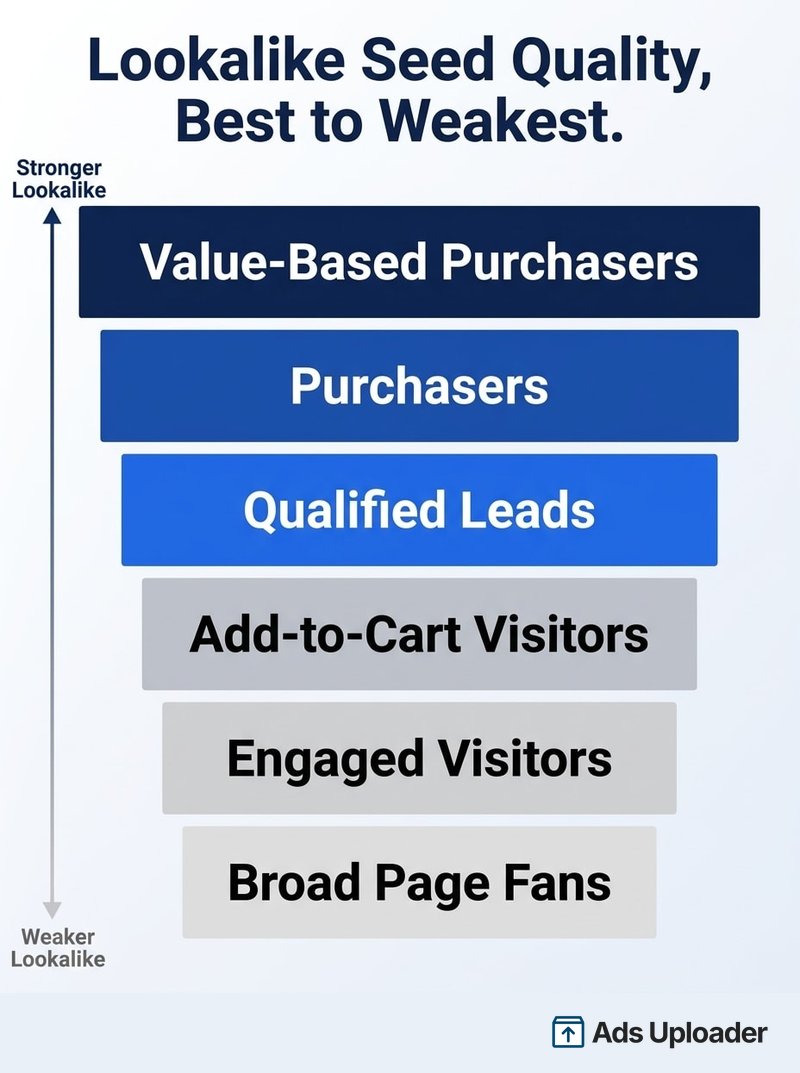
A Seed-Quality Hierarchy
If you rank seed sources by the quality of lookalike they tend to produce, the order is consistent across accounts. Value-based purchasers sit at the top because they carry both intent and value. Then come plain purchasers, then qualified leads, then add-to-cart or high-intent browsers, then general engaged visitors, and finally broad page fans at the bottom. When you have the data to build a seed near the top of that list, use it.
On sizing the seed itself: Meta requires a minimum of 100 people from a single country to create a lookalike, and it will refuse to build one from a smaller seed. That minimum is a floor, not a goal. In practice, a seed of 1,000 to 5,000 people gives the model enough signal to work with, and many advertisers go higher. If your seed has fewer than 100 people in the country you want to target, Meta can pull similar profiles from other countries to meet the threshold, an option known as international seeds.
Launch More. Click Less.
Upload hundreds of creatives at once, auto-match thumbnails to videos, and export directly to Meta Ads Manager.
Try Ads Uploader FreeNo credit card required • 7-day free trial
Choosing Your Lookalike Audience Size (1% to 10%)
When you create a lookalike, you choose a similarity size as a percentage of a selected country's population, from 1% to 10%. This single setting confuses more buyers than anything else in the workflow, so it is worth getting right.
A 1% lookalike is the smallest and most similar group: the top 1% of people in that country who most closely resemble your seed. A 10% lookalike is the largest and broadest: a much bigger pool whose members resemble your seed far less tightly. Everything in between trades precision for reach in a straight line. Lower percentages mean a closer match and a smaller audience; higher percentages mean more reach and a looser match. (Meta's Marketing API exposes an even wider range, up to 20% with custom ratios, but the standard interface tops out at 10%.)
The right number is a budget and intent decision, not a default.
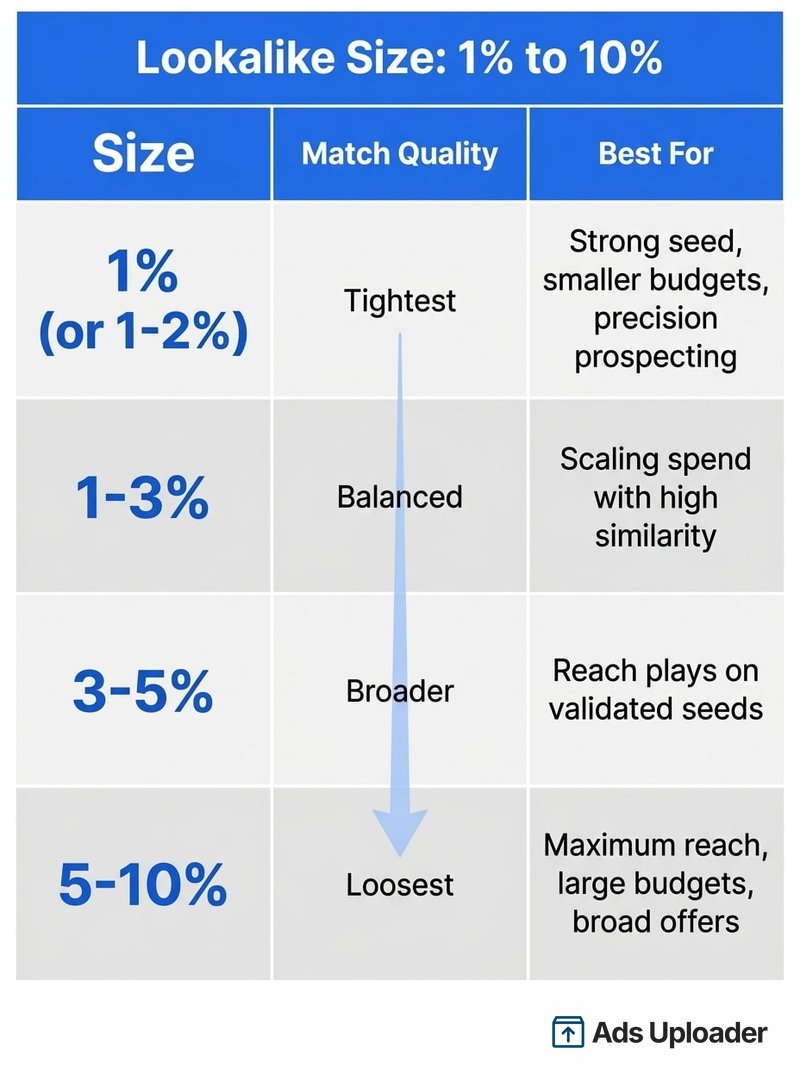
Which Percentage Should You Use?
- 1% (or 1% to 2%): The tightest prospecting layer. Use it when your seed is strong, your offer is specific, or your budget is modest and you want every dollar spent on the closest matches.
- 1% to 3%: A balanced default for accounts that are scaling and want more volume than a pure 1% can deliver without giving up much similarity.
- 3% to 5%: A reach play for healthy budgets that have already validated the seed at smaller sizes.
- 5% to 10%: Maximum reach for large budgets and broad offers, where you accept a looser match in exchange for scale.
A common and effective approach is to create several bands at once, for example a 1%, a 1% to 3%, and a 3% to 5%, then test them in separate ad sets and let performance decide. Two practical notes while you do this: the people in your source audience are automatically excluded from the lookalike, so you are never paying to reach your own seed, and you can generate up to roughly 500 lookalikes from a single source if you want to slice it finely. Watch for overlap when you run multiple bands against the same campaign, since the same user can qualify for several of them.
Value-Based and Advantage Lookalikes
Two variations are worth understanding because they change what the model optimizes for.
A value-based lookalike uses a seed where each person carries a numeric value, such as total spend or lifetime value. Instead of treating every customer equally, Meta weights the model toward your higher-value customers, so the resulting audience skews toward people who resemble your best buyers rather than your average ones. It requires a value column in your customer list or value-tagged events, and for most ecommerce accounts it is the single highest-leverage seed you can build. We cover the setup and the data requirements in the guide to value-based audiences.
Advantage lookalike, formerly called lookalike expansion, lets Meta deliver beyond your chosen percentage when the system predicts better results outside that bracket. If you build a 1% to 2% lookalike, Advantage can pull in people just outside it to improve delivery. By 2025 this was switched on by default on many new and duplicated ad sets. It is not a magic upgrade, and you can turn it off, but it does mean your stated percentage is increasingly a starting point rather than a hard wall. Treat it as the system's permission to go broader, and judge it on results.
Save Hours on Creative Testing
Stop uploading ads one by one. Bulk process unlimited creatives with automatic media matching and direct API publishing.
Try Ads Uploader FreeNo credit card required • 7-day free trial
Lookalike Audiences in 2026: What Changed
If your lookalike playbook is a few years old, several things have moved.
Location is now set in the ad set, not at creation. You used to lock a country into the lookalike itself. Now you build one lookalike audience and choose the geography at the ad set targeting level, which makes a single seed reusable across markets.
Special Ad Categories block lookalikes. Ads for housing, credit, and employment cannot use standard lookalike audiences, because Meta restricts targeting on those categories to prevent discrimination. If you run in a special category, you use Meta's restricted Special Ad Audience tools instead.
Sensitive-data audiences are flagged. As of September 2025, custom and lookalike audiences built on health or financial-condition data are flagged and can be limited, so seeds that lean on sensitive categories may not behave as expected.
Signal loss reshaped seed quality. After Apple's App Tracking Transparency cut device-level signals, pixel-only seeds weakened and some advertisers saw costs rise. The practical response is to lean on first-party data: customer lists and a server-side feed through the Conversions API now produce noticeably stronger seeds than a thin pixel alone.
Refresh and lifecycle. A lookalike auto-refreshes roughly every three to seven days while it is in an active ad set, updating as new signals arrive. New lookalikes usually populate within a few hours, occasionally up to 24, and you can run ads while they populate. Leave one unused for around 90 days and it goes inactive, then expires after long disuse, so dormant audiences are worth rebuilding rather than reviving.
How to Build a Lookalike Audience
The mechanics are quick once the thinking is done:
- In Ads Manager, open Audiences and choose Create Audience, then Lookalike Audience.
- Select your source: a custom audience, a value-based source, or a page.
- Choose the size from 1% to 10% (or create several bands at once).
- Create it, then set your location at the ad set when you build the campaign.
For agencies and buyers running this at volume, a few habits pay off: name audiences clearly by seed and percentage so a 1% purchaser lookalike is never confused with a 5% engager lookalike, test bands rather than guessing a single number, layer lookalikes alongside broad targeting instead of betting everything on one, and refresh seeds on a schedule so the model is learning from current data. Whether you build these by hand in Ads Manager or script them through the API, the discipline is the same: good seed, deliberate size, clean naming, regular refresh.
Frequently Asked Questions
How big does my source audience need to be for a lookalike? At least 100 people from a single country, which is the hard minimum. Aim for 1,000 to 5,000 for a stronger model, and favor a smaller high-quality seed over a large mixed one.
What percentage should I choose, 1% or 10%? Use 1% for the tightest match and smaller budgets, and move toward 10% as you prioritize reach over similarity. Testing several bands at once is the reliable way to find the sweet spot for your account.
What is a value-based lookalike audience? A lookalike built from a seed that includes a value per customer, so Meta weights the model toward your highest-value buyers rather than treating every customer the same.
Do Facebook lookalike audiences still work after iOS 14 and signal loss? Yes, but quality now depends on first-party data. Pixel-only seeds degraded after App Tracking Transparency, so customer lists and the Conversions API produce the strongest seeds.
How often do lookalike audiences refresh? Roughly every three to seven days while in an active ad set. New ones populate within hours, and unused ones go inactive after about 90 days.
Can I use lookalike audiences for housing, credit, or employment ads? No. Those fall under Special Ad Categories, which prohibit standard lookalikes; you must use Meta's restricted Special Ad Audience tools instead.
Conclusion
A Facebook lookalike audience is one of the most dependable ways to find new customers on Meta, but only if you respect what drives it. The model is a mirror of your seed, so the quality of the audience you build is set the moment you choose the source.
The takeaways are simple to hold and hard to beat:
- Feed it your best customers, not all of them. A clean, high-value seed beats a big messy one.
- Start tight at 1% to 2%, then scale to wider bands once the seed proves itself.
- Use a value-based seed whenever you have value data, since it points the model at your best buyers.
- Mind the 2026 realities: Special Ad Category limits, first-party data, and refresh cycles.
Pick one strong seed, build two percentage bands from it, and let real spend tell you which one your account prefers. For more authoritative detail, Meta documents the basics in its About Lookalike Audiences help article and the full technical behavior in its Marketing API documentation.
