A Facebook custom audience is an ad targeting option that lets advertisers build a reachable audience from data they already own or from how people engaged with their business on Meta. You provide a source (a customer list, website pixel traffic, app activity) or pick a Meta engagement source (video views, lead forms, your Page), and Meta matches it to users across Facebook, Instagram, Messenger and WhatsApp. Each ad account can hold up to 500 custom audiences, and any one of them can seed a lookalike audience.
Custom audiences are the warm-traffic backbone of almost every Meta account. They are how you reach people who already know you: past site visitors, existing customers, video watchers, lead-form openers. Yet most explainers cover only half the source types and stop, and Meta itself scatters the definition across a dozen separate help pages.
This is the complete map. You will get a plain definition, every source type in both categories, how matching actually works, how to build an audience in Ads Manager, and how to manage them once you have more than a handful. Custom audiences are one rung of the broader Meta audience targeting system, so if you want the wider strategy context, start there and come back here for the source-by-source detail.
What Is a Facebook Custom Audience?
A custom audience is a list of people you already have a relationship with, rebuilt inside Meta so you can advertise to them. You hand Meta a source of identifiers, and Meta finds those same people among its own users. Meta's own help center documentation on custom audiences frames it as building audiences from your own data sources or Meta engagement data.
The mental model that makes everything else click: there are two kinds of source. Your sources are data you own and bring to Meta, like a CRM customer list or pixel traffic from your website. Meta engagement sources are activity that already happened on Meta surfaces, like people who watched your video or opened your lead form. You upload the first kind. The second kind is already there, waiting to be turned into an audience.
When you upload your own data, Meta hashes the personal identifiers with SHA-256 before they ever leave your side, so Meta never receives raw email addresses or phone numbers. The hashes are irreversible, matched against Meta's user base, and then deleted once matching is complete. What remains is an anonymous list of matched user IDs you can target. Match rates vary widely with data quality and region, but a clean list of recent customers commonly matches somewhere in the 30 to 50 percent range.
One distinction trips people up constantly. A custom audience is not a lookalike audience and not a saved interest audience. A custom audience is people who already know you. A lookalike audience is new people Meta finds who resemble a custom audience. A saved or core audience is interest, demographic and location targeting aimed at strangers. Custom audiences are the warmest of the three.
The Two Categories of Custom Audience Sources
Every source type falls into one of the two buckets, and the bucket tells you most of what you need to know about how it behaves.
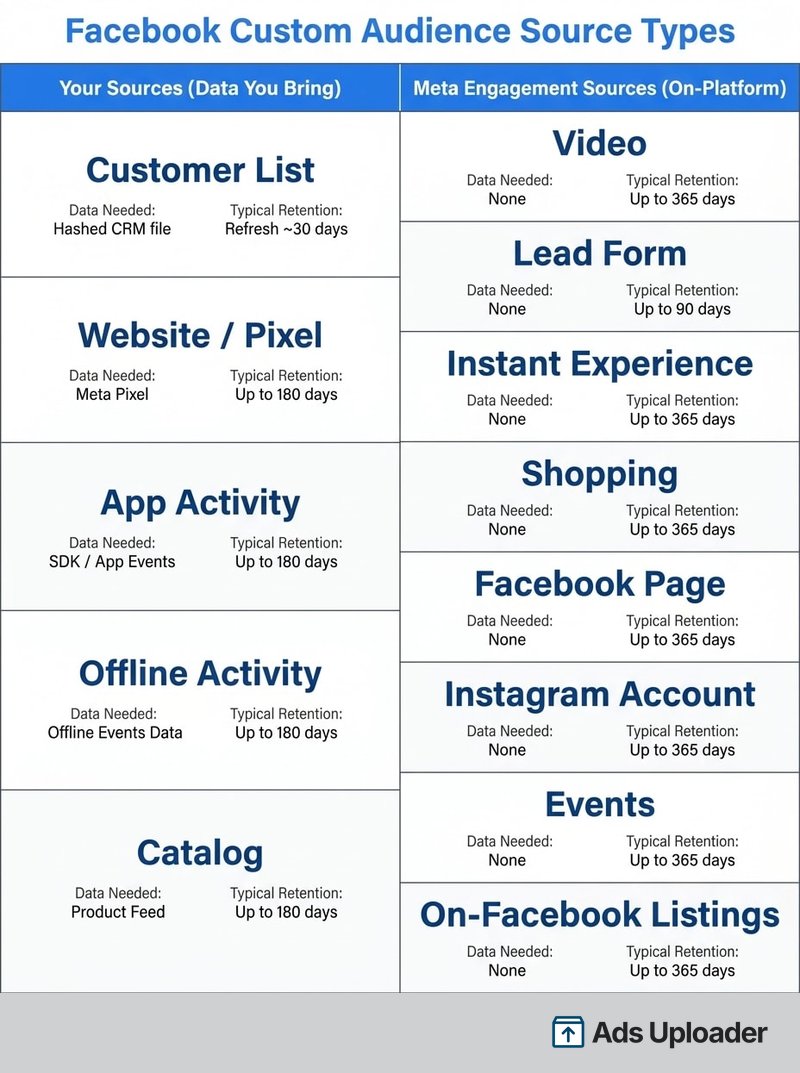
Your sources are first-party data you control: customer lists, website pixel traffic, app activity, offline events and catalog interaction. These require setup, carry data-ownership and consent obligations, and (for lists) need manual refreshing. They are also your most valuable signal because they represent real commercial relationships.
Meta engagement sources are on-platform activity: video views, lead forms, Instant Experiences, shopping, your Facebook Page, your Instagram account, events and On-Facebook listings. These need no data upload and update automatically as new people engage. They are the easiest way to build a warm audience when you do not yet have a pixel or a list.
The practical takeaway: if you own the data, you bring it and maintain it. If the engagement happened on Meta, the audience builds itself.
Every Custom Audience Source Type
Here is the complete list, grouped by category, with what each one needs and the retention window you can typically set. Retention is the lookback: how far back, and how recently, someone must have acted to stay in the audience.
Website Custom Audiences (Pixel)
People who visited your site or took specific actions, captured by the Meta Pixel or the Conversions API. You can target all visitors or narrow to specific URLs and events, which is what makes this the foundation of most retargeting. Retention runs up to 180 days for most events, and the audience rolls forward automatically as new visitors arrive.
Customer List Custom Audiences (CRM)
Upload a file or sync a CRM feed of emails, phone numbers or user IDs. Meta hashes and matches them, and your list should include at least 100 customers to be useful. This is the source for reaching buyers and subscribers who may never have visited recently. Lead-generation accounts often feed this audience straight from their lead ads. For the full step-by-step, see how to build a customer list custom audience. One thing to watch: a customer list does not update itself and is flagged "Outdated" roughly 30 days after the last upload.
App Activity Custom Audiences
People who took actions in your mobile app, tracked through the Facebook SDK or App Events API. You choose the events, such as completed registration or in-app purchase, and target people who triggered them. App-event audiences are commonly held for up to 180 days.
Launch More. Click Less.
Upload hundreds of creatives at once, auto-match thumbnails to videos, and export directly to Meta Ads Manager.
Try Ads Uploader FreeNo credit card required • 7-day free trial
Offline Activity Custom Audiences
Customers who transacted offline, in a store or over the phone, whose data you upload through Offline Events. You map your records to Meta event types so an in-store purchase can become a targetable audience. Offline audiences typically allow retention up to 180 days.
Catalog Custom Audiences
People who viewed, added to cart or purchased items in your product catalog, usually in service of dynamic ads. This requires a connected catalog with a product feed, and interactions can typically be held for up to 180 days.
Engagement Custom Audiences (Meta Sources)
These are built entirely from on-platform activity, with no upload required, and they update automatically:
- Video: people who watched your Facebook or Instagram video to a chosen threshold (3 seconds, 25 percent, 75 percent and so on). Holds up to 365 days. Reels views generally roll up here rather than into a separate source.
- Lead form: people who opened or submitted your lead ad form, commonly up to 90 days.
- Instant Experience: people who opened or clicked through your full-screen Instant Experience ad, typically a shorter window around 30 days.
- Shopping: people who engaged with your Facebook or Instagram Shop, up to 180 days.
- Facebook Page: people who interacted with your Page, including visits, post engagement, messages and call-to-action clicks, up to 365 days.
- Instagram account: the Instagram equivalent, covering profile visits, post and ad engagement and messages, up to 365 days.
- Events: people who responded to your Facebook events, generally up to 180 days.
- On-Facebook listings: people who interacted with your Marketplace listings, usually around 30 days.
Available sources and exact windows can shift, so confirm what your account offers in Ads Manager at build time. Meta has also tested message-based sources, such as people who messaged your business, which often appear under Page or Instagram engagement.
How to Create a Facebook Custom Audience
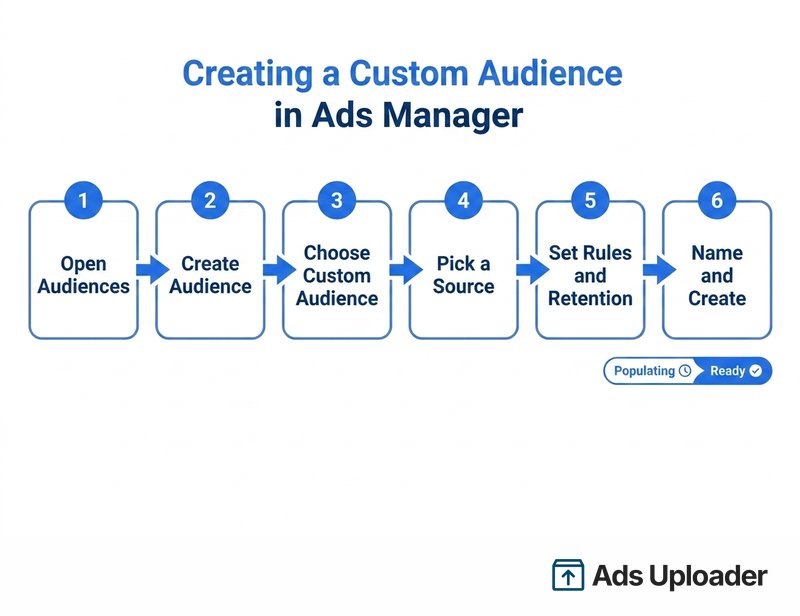
The flow is the same regardless of source. Whether you build in the browser app or script it through a CLI, the underlying steps in Ads Manager are:
- Open Audiences in Ads Manager.
- Select Create audience, then Custom audience.
- Choose your source (website, customer list, video, Page and so on).
- Configure the rules: which events or URLs, the retention window, and any include or exclude conditions.
- Name the audience and create it. Its status moves from Populating to Ready.
A customer list has a few extra steps. You prepare and format the file, upload it or paste comma-separated values, match your columns to Meta's fields so identifiers map correctly, accept the custom audience terms, and import. Meta then hashes and matches, and your audience populates.
The operational reality for agencies and busy media buyers is that building one audience is trivial and managing dozens across many ad accounts is not. Naming conventions, refresh schedules and consistent exclusions become real work once you are running audiences at scale.
Custom Audience Best Practices and Management
Once you can build any source, the difference between a tidy account and a messy one comes down to how you manage windows, freshness and combinations.
Match the retention window to intent. Short windows (7 to 30 days) suit hot signals like add-to-cart or checkout, because those people are still warm. Longer windows (90 to 365 days) suit broad engagement like video views and Page interaction, where you are capturing more of the funnel. Recent action is almost always the stronger signal.
Keep your data fresh. Refresh customer lists at least monthly so they do not go Outdated, and strip opted-out contacts before each upload. For pixel and app audiences, confirm your events are firing. Higher data quality means a higher match rate, which means a larger usable audience.
Combine and exclude deliberately. In an ad set, multiple included custom audiences stack as an OR union, while exclusions remove people you do not want to reach. A classic pattern is to target cart abandoners while excluding recent purchasers. Exclusions are worth treating as a discipline of their own; see how to exclude a custom audience cleanly so you stop paying to reach people who already converted.
Mind the limits. Each ad account holds up to 500 custom audiences, and a custom audience generally needs about 100 matched people in the target country before Meta will deliver ads to it. If an audience is too small, broaden the window, combine sources or add data.
Handle privacy as the data controller. When you upload customer data, you are the data controller, and Meta's Customer List Custom Audiences Terms require you to have a lawful basis (such as consent) for every person on the list. Hashing protects identifiers in transit and Meta never tells you which individuals matched, but GDPR, UK GDPR and CCPA or CPRA compliance at the point of collection is your responsibility, not Meta's.
Custom Audiences vs Lookalike Audiences
The two are constantly confused, so hold the line between them. A custom audience is warm: people who already know you. A lookalike audience is cold: brand-new people Meta's model judges to be similar to a custom audience you provide as a seed.
Any custom audience can seed a lookalike. Meta requires at least 100 seed members from a single country, and generally does better with a seed of 1,000 or more. Source quality beats size: a tight list of high-value buyers produces a better lookalike than a sprawling list of newsletter signups.
In 2026, much of this happens inside Meta's AI anyway. Advantage+ can take a custom audience as a suggestion and find similar people automatically, rather than treating your audience as a hard wall. That makes feeding strong first-party data into Meta more valuable than ever, whether you then build a formal lookalike or let the system expand from the seed.
Frequently Asked Questions
Save Hours on Creative Testing
Stop uploading ads one by one. Bulk process unlimited creatives with automatic media matching and direct API publishing.
Try Ads Uploader FreeNo credit card required • 7-day free trial
What Is the Minimum Size for a Facebook Custom Audience?
You can upload any number of identifiers, but a custom audience generally needs around 100 matched people in the target country before Meta will deliver ads to it. For customer lists, aim for at least 100 customers, and more is better for match quality. Smaller audiences can be created but will not serve until they clear Meta's minimum.
How Many Custom Audiences Can I Have per Ad Account?
Up to 500 custom audiences per ad account, counted across every source type. If you hit the cap, delete unused or stale audiences to free up room. This is one reason naming conventions and periodic cleanup matter for agencies managing many accounts.
Do Facebook Custom Audiences Auto-Update?
It depends on the source. Website, app and engagement audiences update automatically as new people qualify, so a "last 180 days of visitors" audience rolls forward on its own. Customer list and offline audiences are static snapshots and do not auto-update; you must re-upload or sync new data, and they are flagged Outdated after about 30 days.
Can I Combine Custom Audiences?
Yes. In an ad set you can include several custom audiences, which Meta treats as an OR union, and you can also exclude one or more. For example, target website visitors or lead-form submitters while excluding recent purchasers. Combining and excluding is how you build layered targeting.
What Is the Difference Between a Custom Audience and a Lookalike Audience?
A custom audience is your known people, matched from your data or Meta engagement. A lookalike audience is new people Meta generates who resemble a custom audience seed. You use custom audiences to re-reach people who know you, and lookalikes to expand to similar strangers.
Are Facebook Custom Audiences GDPR-Compliant and Private?
From Meta's side, the process is privacy-protective: only hashed identifiers are processed, raw data is never received, and Meta never discloses which individuals matched. Compliance still depends on you. GDPR, UK GDPR and CCPA or CPRA require that you obtained consent or have a legitimate basis to use each person's data for targeting before you upload it.
Bringing It Together
Custom audiences are your warm traffic rebuilt inside Meta. There are two source categories, your data and Meta engagement, and roughly a dozen source types between them, from pixel traffic and customer lists to video views and Page engagement. You build them in Ads Manager in a few steps, tune them with retention windows and exclusions, and refresh the list-based ones so they do not go stale.
If you are starting from scratch, build the two sources you almost certainly already have: a website custom audience from your pixel and a customer list from your CRM. Add engagement audiences as your video, Page and lead-form activity grows, and use your best custom audiences as lookalike seeds. That sequence gives you a full retargeting and prospecting base without waiting on data you do not have yet.
